Explanation of attendance values used in reports and displays
Last updated: July 1, 2026
This article is intended to provide technical details about attendance data and its integration into Panorama Student Success. All attendance data are sourced from the school’s student information system (SIS) data entry and sent via the school’s SIF agent (data pipeline) to the state’s data warehouse where it is picked up by Panorama and processed into attendance displays. The data are used to populate various system and student level absenteeism reports plus the student’s profile and attendance indicator on the overview report.
From the school’s SIS, there are two attendance data objects (SIF records) that are used: Student Period Attendance and Student Daily Attendance. Each record has multiple data elements with a universally formatted value, see table below for examples of specific values used from each record type. New for the 2025-26 school year, two values were added/updated to further refine attendance tracking. Student Period Attendance objects have an added value called Period Absence Value and Student Daily Attendance records have a value called Daily Absence Value.
Student Period Attendance | Student Daily Attendance |
Section Info - the applicable section (class) School Info - the school building Timetable Period - the class period Time In - when the student entered/returned to this class Time Out - when the student left class Attendance Code - why the student was absent Period Absence Value - The proportion of an instructional day represented by the absent period | School Info - the school building School Year - the applicable school year Time In - when the student entered/returned to school Time Out - when the student left school Attendance note - notes related to attendance event Daily Absence Value - The proportion of an instructional day absent, based upon the sum of all period absences |
Each SIS’s programming determines when a Student Daily Attendance record is generated and sent to the state. In most cases that is based on a student being absent a certain number of periods, but that is completely internal to the school’s SIS and the Iowa team has no way to know what your internal SIS setup is for determining when a Student Daily Attendance record is created and not created. Only Student Daily Attendance record absences are included in the attendance reports and the absence totals you see displayed for individual students. While we do receive Student Period Attendance records, those records are NOT used in calculating attendance report absence values or the absence values you see on student pages. Only the Student Daily Attendance records sent by your SIS are used for report calculations. Your district SIS determines when to generate a Student Daily Attendance record from Student Period Attendance absences. This means that your SIS could be sending us Student Period Attendance absence records without also sending any Student Daily Attendance records for that day, it all depends on how your SIS is set up to generate those Student Daily Attendance records.
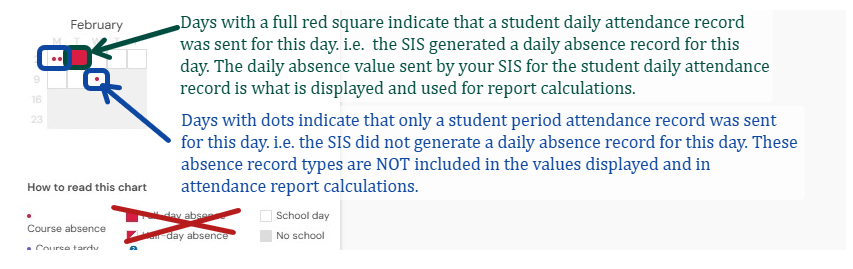
In Student Success an easy way to determine if a Student Daily Attendance record was sent for a day is to look at the calendar view on the individual student profile displays. A screenshot is included below to help explain how to identify what was sent by your SIS. In the below example any days that only include the small dots for period absences are days where ONLY Student Period Attendance records were sent by your SIS and no Student Daily Attendance record was generated and sent for that day. Days where the square is completely blocked out identify that a Student Daily Attendance record was generated and sent by your SIS for that day.
With the new absence values being used, which are decimals to the thousandths and no longer just half or full day values, the fully blocked squares in the calendar no longer represent a full or half day value, they simply represent that a daily absence record was sent for that day. There is no way for you to see the individual daily absence value that was sent by your SIS for each daily absence record within the Student Success platform. You can view the total of all daily absence values sent by looking at the total absences for the student.

What if the absence totals displayed in Student Success do not match the absence values/totals I see in my SIS?
It is important to note that Student Success displays the exact daily absence values received in the SIF data by your SIS. If the totals you see in Student Success do not match with what you see in your local SIS please submit a ticket with a specific example and we can help troubleshoot. We will need to know the name or State ID of a student that has attendance data in Student Success that is not matching the attendance data from your SIS. We will also need to know what absences you see in your SIS for the student. We are only able to see the SIF data your SIS sends, and have no visibility into the attendance displays or reports in your local SIS.