Instructions for Getting Access to Panorama Student Success and/or FastBridge
Last updated: September 8, 2026
TThis document contains access instructions for district, school and AEA staff access to FastBridge and Panorama Student Success. As of November 2025, AEA staff no longer have separate access instructions. More information is available under AEA user access details below.
All staff access to Student Success and FastBridge is via the Iowa Education Portal (EdPortal). There is no direct login for staff to FastBridge or Student Success. The #1 thing to remember about access is that the email addresses in Ed Portal and the district SIS must match at all times - it is the “glue” that connects the user role to the Ed Portal account. For teachers, the email also connects user accounts to rosters.
I’m a staff member who needs access
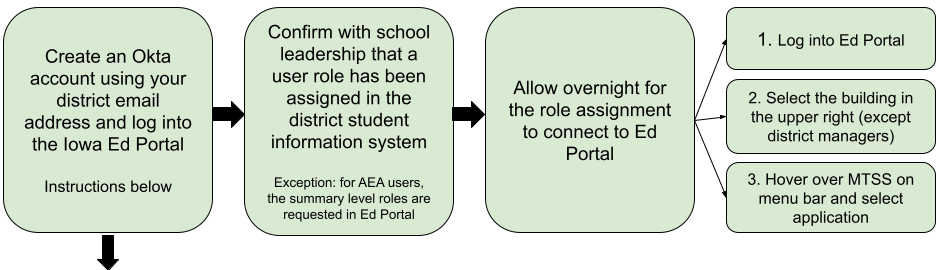
Create a new Okta account for EdPortal. If you already have an account with your current email address, the system will tell you.
I’m a leader assisting a staff member with access
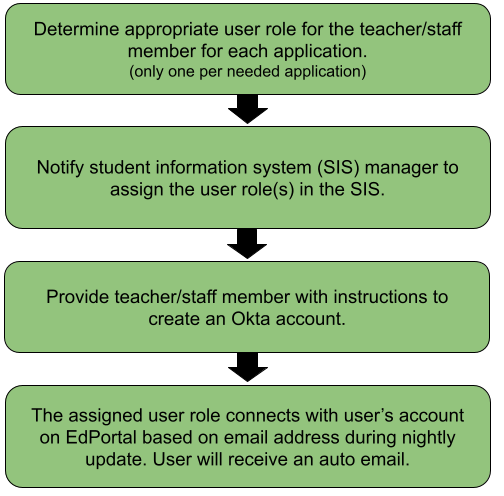
Resources
See AEA user details below for the four user roles available for AEA users.
Assigning MTSS (Panorama Student Success) or FAST User Roles
Those receiving the Classroom User role will require students to be scheduled into a course assigned to them.
Create a new Okta account for EdPortal
Reminders to provide with instructions:
Use their district email address only - no personal emails
Ignore the prompt to request a role within Ed Portal - do not request a role.
No link? See: Troubleshooting Access for what to check.
I’m a student information system (SIS) manager
Here are the instructions you’ll need for Assigning MTSS (Panorama Student Success) or FAST User Roles. One role per needed application is enough, except for teachers with students scheduled with them.
New AEA access details
Great news for Fall 2025! The process for AEA user access has been revamped to be easier and consistent with LEA users. Roles with access to student level data are now entered and managed by the school in their student information system. Below is a chart of the four available roles for AEA staff.
Role | Description | How to get it |
|---|---|---|
Panorama AEA Summary User (PANO_AEA_summary user) |
| User will request this role in their Ed Portal account. The AEA Security Officer approves. |
Panorama Building User |
| District/school assigns role in their student information system |
FAST Consortium |
| User will request this role in their Ed Portal account. The AEA Security Officer approves. |
FAST Specialist |
| District/school assigns role in their student information system |
Troubleshooting
Contacts for additional help
Contact the EdPortal team at ed.portal@iowa.gov or 515-725-2040 if you encounter issues with:
setting up your Okta account
accessing the EdPortal website
password issues or Okta account locked
updating your Okta information
Contact the Panorama Student Success support team via the “Need Help?” link in Student Success or by emailing support_Iowa@panoramaed.com for help with the following:
you can log into Ed Portal but there is no MTSS link (after you select the correct district or building in the upper right corner)
any problem encountered after you click the Panorama Student Success link, such as an error message or a roster issue.
Contact the FastBridge support team via “Support” in the FastBridge system or by emailing iowafastbridgehelp@renaissance.com for help with the following:
you can log into Ed Portal but there is no MTSS drop-down menu or FastBridge link underneath (after you select the correct district or building in the upper right corner)
any problem encountered after you click the FastBridge link, such as an error message or a roster issue.
Common terms
Autoprovisioning: the nightly process that connects user roles from SIS to accounts in Ed Portal
EdPortal: Iowa’s Education Portal to access a variety of education applications in one location
FastBridge or FAST: assessments and system contracted by Iowa
Okta account: Type of secure account used for logging into EdPortal and potentially other state applications.
Panorama Student Success: Iowa’s MTSS data system. Home of Healthy Indicator and other valuable reports.
Student Information System (SIS): data system used by schools that contains student and staff information. Likely Alma, JMC, Powerschool, or Infinite Campus.
User roles: assigned in the district SIS, the MTSS, FAST, and ACHIEVE user roles control staff access to each system.