Enhancements to Group Intervention Progress Monitoring
Last updated: September 2, 2026
Progress monitor the whole group in one workflow
In response to user feedback, several desired enhancements have been made to group intervention plan management.
Notes & scores per student
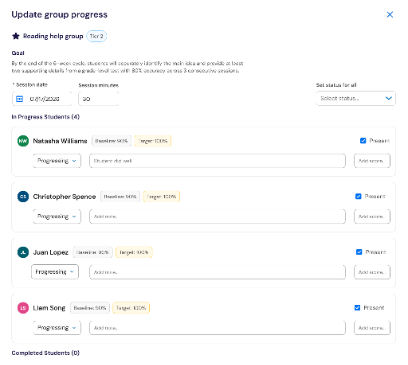
All from the same page, notes can be entered for each student individually, so educators can capture the specific progress and supports unique to that student. Scores can be added per student when the intervention is tracked quantitatively.
Attendance & session details
Each student defaults to “Present” and can be marked absent individually. Session date defaults to today, and session minutes populate automatically from the intervention schedule.
Completing group interventions
Complete the whole group
Select “Complete Plan” from More Actions to close out the group. You can provide individualized updates for each student, all from the same page.
Students who finished the intervention already, move to a “Completed Students” section at the bottom of the page — keeping the full group visible while focus stays on students whose interventions are still active.